Array Flatten in JS

Hello readers, in this blog we would be discussing one of the most common array method asked during interviews i.e. Array.flat()
Nested Arrays
The real reason why we use the .flat() method is because nested arrays exists.
A nested array is nothing but an array within another array.
const nested = [1, 2, [10, 20, [100, 200, 300]]]
The above code shows a nested array, you can see how there are array inside more arrays.
Nesting Levels
One thing to understand is the depth of nesting in an array. It is way easier and intuitive to understand that through examples directly.
Level 0
const arr =
[1,
2,
3]
Level 1
const arr =
[1,
  [10, 20],
2]
[10, 20]is inside the main array so it's 1 level deepLevel 2
const arr =
[1,
  [10,
    [100, 200, 300],
  20],
2]
[100, 200, 300]is inside[10, 20][10, 20]is inside[1, 2]
so[100, 200, 300]islevel 2and[10, 20]islevel 1
Do you see a pattern ? Each time you open a box and find another array → depth increases by +1.
Now the problems statement is that you need to find a way to bring these nested arrays on the same level like the code block below:
const originalArray = [1, 2, [10, 20, [100, 200, 300]]]

//wanted formats
[1, 2, 10, 20, 100, 200, 300] //wanted format 1
[1, 2, 10, 20, [100, 200, 300]] //wanted format 2
These are the time Array.prototype.flat() comes to save the day !
Why Flattening Arrays Is Useful ?
There are many scenarios where you might want to flatten an array, some of them are:
Api Responses: When you get some response from an api, you can get deeply nested arrays, for e.g. when you have relationships between tables (like users → posts → comments). In such cases flattening helps extract only relevant data so you can process or display it easily without constantly drilling into multiple layers.
Data Processing Pipelines: When working with data transformations (e.g., chaining
map,filter,reduce), nested arrays can break the flow. Flattening ensures that your data stays in a consistent structure, allowing smooth chaining of operations.Functional Programming Transformations: In functional programming, operations often return arrays (like
mapreturning arrays of results). This can quickly lead to nested arrays, and flattening helps bring everything back to a single level.
Array.flat() Method
To get the job done quickly, JS gives us a build in solution:
arr.flat(depth);
[1, [2, 3]].flat();
// [1, 2, 3]

[1, [2, [3]]].flat(2);
// [1, 2, 3]
Key Points:
the depth defines the level of nesting you are targeting to flatten
the default depth is 1
If you are not aware of the level of depth and want all to flatten everything you can pass
Infinityas depth.If you pass depth more than the nesting that is there, then it will flatten the whole array.
Interview
Js has made our life easy, but interviews are about testing the level of understanding we have about nesting and how we would resolve the issue without using the in-built method.
Using Recursion
One of the easiest way to implement the array.flat is through simple recursion.
function flatten (arr, depth = 1){
    let result = [];
    for (const item of arr){
        if(Array.isArray(item) && depth > 0){
            result= result.concat(flatten(item, depth-1))
        }else{
            result.push(item)
        }
    }
    return result;
}
Now the above implementation is good and will work as expected, but if you want to impress, you should check that everytime a new array is created for nesting, this is a costly operation. SO a better way to do the same could be:
function optFaltten (arr, depth = 1){
    let result = [];
    function helper (a, d = 1){
        for (const item of a){
            if(Array.isArray(item) && depth> 0){
                helper(item, d-1);
            } else{
                result.push(item)
            }
        }
    }

    helper(arr, depth);
    return result;
}
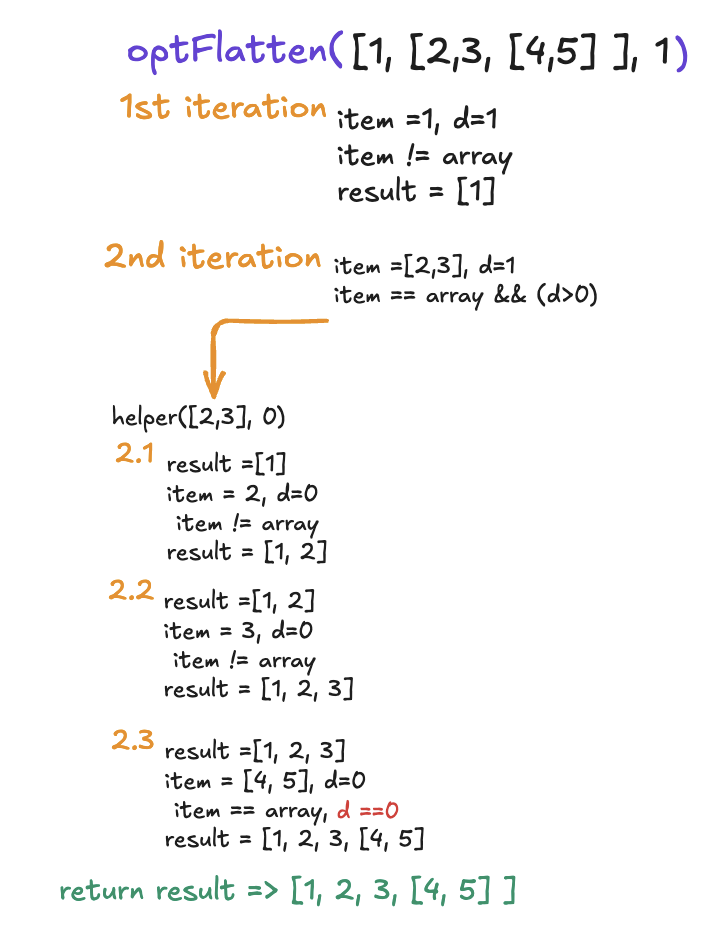
This does the same thing, with the exception of not creating a new array everytime it goes a level deep to flatten.
Using Reduce
If you enjoy using reduce, this is the part you should definitely check!
function flattenReduce(arr, depth =1){
    const result = [];
    return arr.reduce((acc, value)=>{
        if(Array.isArray(value) && depth > 0){
            acc.push(...flattenReduce(value, depth - 1))
        }else {
            acc.push(value)
        }
        return acc
    },[])
}
Using Stack
function flatten(arr, depth =1){
    const stack = arr.map(item => [item,depth]);
    const result = [];
    while(stack.length){
        const [value,d]= stack.pop();

        if(Array.isArray(value) && d>0){
            for(let i = value.length-1; i>=0; i--){
                stack.push(value[i], d-1)
            }
        }else {
            result.push(value);
        }

    }
    return result;
}
Conclusion
That is all for this blog, flatten is a very unique method to be used and writing its implementation is an interview question for most js developers.


