Exploring HTML
HTML is easy to use hence it is often not taken seriously, however knowing the proper basics of HTML can really help in the long run.
What is a Markup language
You would hear everyone telling that HTML is not a programming language rather a markup language but only a few would go to explain, what is a markup language, I would be among the few to make you understand
Originally, editors would mark up manuscripts with notes like:
“this is a heading”
“this is important”
“this should be a paragraph”
Markup languages do the exact thing but for computers. You can say that markup language marks up plain text to tell a computer how that part needs to be treated.
HTML ?
HTML stands for Hyper Text Markup Language. It is not a programming language, but a markup language.
Most modern websites are built using lot of libraries and frameworks, but it all breaks down to HTML, CSS, JS.
You can consider HTML to be the skeleton of any webpage. You add muscles to this skeleton by inserting css in it.
HTML as the skeleton of a webpage:
defines what content exists
gives meaning and structure to text, images, links, etc.
Without the skeleton, there is no use of muscles in the first place.
HTML5 ?
HTML5 is the latest major version of HTML used to structure and describe content on the web.
It modernized HTML by adding semantic meaning, native media support, and browser APIs—so we don’t need extra plugins or hacks anymore.
What is an HTML Tag?
We write HTML using tags.
An HTML tag could be said as a keyword wrapped in angle brackets (< >) that tells the browser how to treat content.
<p>
Tags act as labels for content. You can consider HTML tag as a box.
<div> Hello Saurav </div>
The opening tag <div> could be considered as opening of the box. The closing tag </div> could be considered as closing of the box and the content between the tags as the content of the box. So now you open a box and put some content inside it and close the box, there could be different boxes (<div> <img> e.t.c) and each box has different use cases. The box tells the browser what was to use the content inside it.
What is an HTML element?
In the above section we already discussed what tags in HTML are, element is just the complete box itself, i.e. an HTML element = opening tag + content + closing tag.
Tag →
<p>Element →
<p>Hello World</p>
Different Type of HTML Elements
There are numerous number of HTML elements and they can be distinguished from each other in numerous ways, but some of the most used distinctions are as follow:
- Self-closing Elements: These elements don’t have content, and hence don’t need a closing tag. These are also called as void elements.
<img />
<br />
<hr />
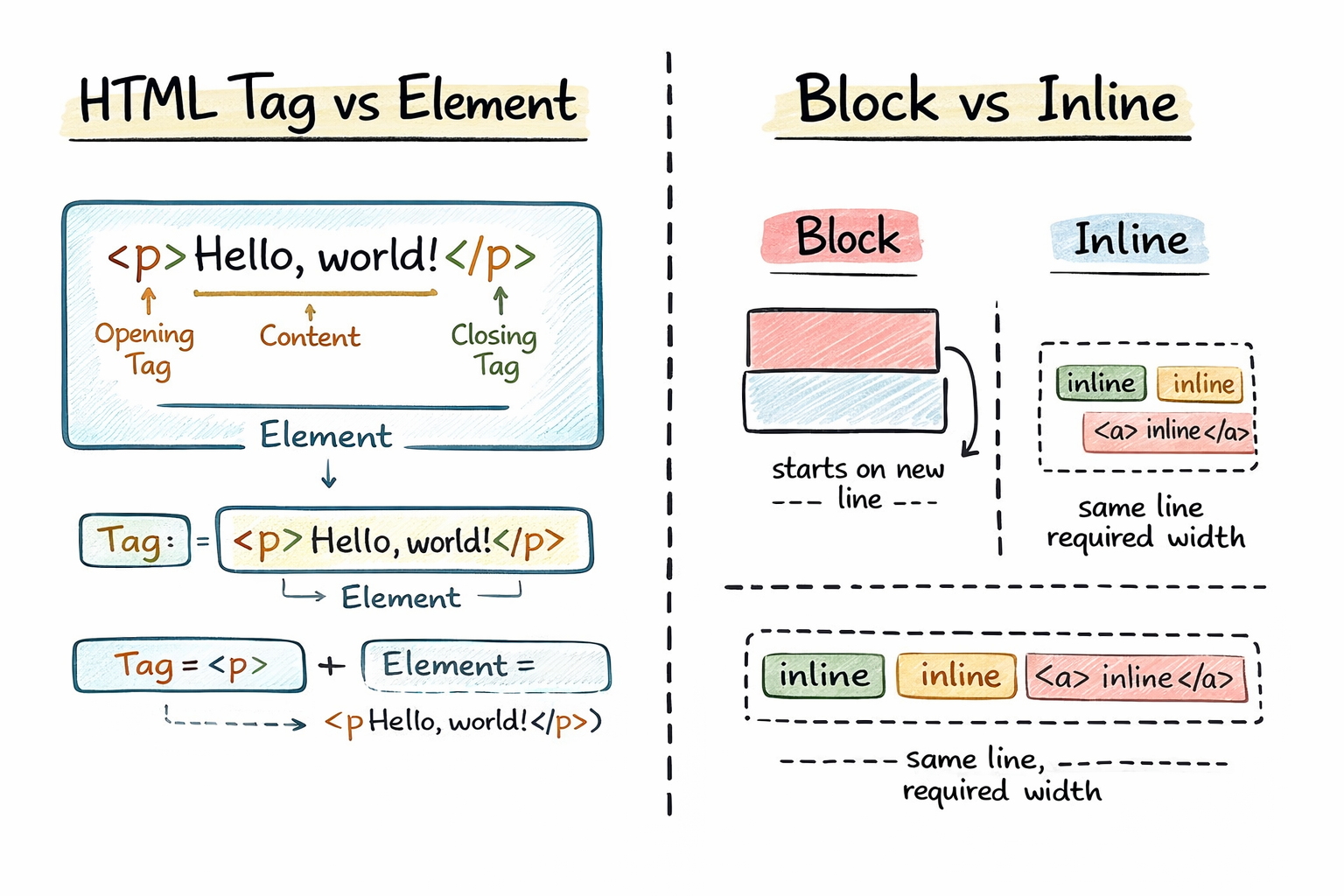
- Block-level & Inline elements: The block level elements start on a new line and take the full width, any element that is placed after it goes to the next line.
<h1>
<p>
<div>
Inline elements on the contrast stay in the same line and take only the required space.
<span>
<a>
<strong>
Block = new line, full width
Inline = same line, required width
How to check HTML
Every site on the web is made up of HTML as its base.
To inspect the HTML of any webpage in the browser:
On Mac
Press
Cmd + Option + Ior Right-click → Inspect
On Windows / Linux
Press
Ctrl + Shift + Ior Right-click → Inspect
This opens the Developer Tools, where you can view and explore the page’s HTML structure in the Elements tab.
Is HTML really that IMPORTANT ?
HTML is important because it gives meaning to content, not just structure.
When HTML is written properly using correct semantic tags, screen readers can accurately interpret and read the page for visually impaired users.
If HTML semantics are ignored or misused, screen readers struggle to understand the content, making the website inaccessible.
In many countries, accessibility is a legal requirement, and poorly structured or inaccessible websites can lead to legal notices, penalties, or fines.
HTML Resume
I am a firm believer of practicing out thingsBelow I am dropping an HTML resume that you could use to learn some of the common tags:
<!doctype html>
<html lang="en">
<head>
<meta charset="UTF-8" />
<meta name="viewport" content="width=device-width, initial-scale=1.0" />
<title>Resume</title>
</head>
<body>
<hr />
<!-- Header Section -->
<header>
<h1>John Doe</h1>
<p>Full Stack Developer | Web Designer | Tech Enthusiast</p>
</header>
<hr />
<!-- Main Section-->
<main>
<!-- About Section -->
<section id="about-me">
<h2>About Me</h2>
<p>
I am a passionate developer with 5+ years of experience in building
web applications. I specialize in HTML,CSS,JavaScript, and backend
technologies
</p>
</section>
<hr />
<!-- Skills Section -->
<section id="skills">
<h2>Skills</h2>
<ul>
<li>HTML5 & CSS3</li>
<li>JavaScript</li>
<li>React & Vue.js</li>
<li>Node.js & Express</li>
<li>MongoDB & MySQL</li>
<li>Git & GitHub</li>
</ul>
</section>
<hr />
<!-- Experience Section -->
<section id="experience">
<h2>Experience</h2>
<table border="1">
<thead>
<tr>
<th>Position</th>
<th>Company</th>
<th>Duration</th>
</tr>
</thead>
<tbody>
<tr>
<td>Senior Developer</td>
<td>Tech Solutions Inc.</td>
<td>2021 - Present</td>
</tr>
<tr>
<td>Web Developer</td>
<td>Digital Innovations</td>
<td>2019 - 2021</td>
</tr>
<tr>
<td>Junior Developer</td>
<td>StartUp Co.</td>
<td>2018 - 2019</td>
</tr>
</tbody>
</table>
</section>
<hr />
<!-- Projects Section -->
<section id="projects">
<h2>Projects</h2>
<article id="project-1">
<h3>Project 1: E-Commerce Website</h3>
<p>
Built a fully functional e-commerce platform with product listings,
cart management, and payment integration.
</p>
<ul>
<li>Technologies: React, Node.js, MongoDB</li>
<li>Timeline: 6 months</li>
</ul>
</article>
<article id="project-2">
<h3>Project 2: Blog Platform</h3>
<p>
Developed a blogging platform with user authentication and content
management features.
</p>
<ul>
<li>Technologies: HTML, CSS, JavaScript, Express</li>
<li>Timeline: 3 months</li>
</ul>
</article>
</section>
<hr />
<!-- Education Section -->
<section id="education">
<h2>Education</h2>
<table border="1">
<thead>
<tr>
<th>Degree</th>
<th>Institution</th>
<th>Year</th>
</tr>
</thead>
<tbody>
<tr>
<td>Bachelor in Computer Science</td>
<td>State University</td>
<td>2018</td>
</tr>
<tr>
<td>Web Development Bootcamp</td>
<td>Online Academy</td>
<td>2017</td>
</tr>
</tbody>
</table>
</section>
<hr />
<!-- Contact Section -->
<section id="contact">
<h2>Contact</h2>
<p><strong>Email:</strong> john.doe@example.com</p>
<p><strong>Phone:</strong> +1 (555) 123-4567</p>
<p><strong>Location:</strong> New York, USA</p>
</section>
</main>
<hr />
<!-- Footer Section -->
<footer>
<p>© 2024 John Doe. All rights reserved.</p>
</footer>
</body>
</html>
Copy this code into a file and save it as index.html and then open this file using browser and you would be stunned by the minimalist resume. TRY OUT !
Conclusion
It is safe to say that HTML is the skeleton of a website and learning it could make us better than most developers out there because then we would be understanding the deeper meaning of how to present things on the web.


