JavaScript Modules: Import and Export

Hello reader, this blog topic is so easy and important that it feels illegal to not know this and start you JS journey. We would be covering the basics of import and export with just enough details to get you started on this.
Where did it all begin?
We already know that it is a good idea to reuse something and not write everything and that's how we came with the idea to create functions. Now creating reusable things is not enough, you need to make a decision on how you want to organise them in your code base.
You can write everything related to your project detail in a single file or break it into chunks with similar behaviour and keep the organised in different files. The decision is on you to make.
What are modules, and why do we need them?
When you have decided to break you entire code in smaller chunks and keep them in different files then you are making small modules of code. You need to have codes into modules so that it is easy for you to debug.
Modules make it easier to debug because if you understand the potential reason that is causing the bug, you simply need to look into that section which is causing it, now if all you code was in a single file, you would need to find the code itself, but if your files were organised properly into modules, then you spend most of your time in debugging and very less time in finding where the code is actually present.
Another reason to not write all code in one file is collaboration, consider you are working with many developers, now if everyone was to edit their changes into a single file, it would be nothing less than a nightmare when it comes to committing those changes.
Also sometimes if you keep all your changes in a single file then a single failure in one segment of code can cause the entire application to go down, however if the code is modular then maybe other pieces of the application would work fine unless the one with the bug is visited.
In a nutshell without modular code it might be
Hard to find things
Hard to reuse code
Multiple people can’t work easily
Changes in one place can break everything
Exporting functions or values
Now that we have all agreed on writing modular code, it is time we understand that just writing code which work similar in different files isn't going to make it, we need to export them as well.
Now to make something from a file available to other code files we make use of the export keyword.
export function multiplyBy10 (num){
  return num*10;
}
Now there are multiple ways in which you can export something from your file, let us get started with it.
Named Exports
Inside the named exports, there are two ways of achieving the same thing:
inline export
grouped export
function add (num1, num2){
  return num1 + num2;
}

function subtract (num1, num2){
  return num1 - num2;
}

const project = "Tech Everyday"

export {add, subtract, project}
One way is to first declare all the function or variables and then at the end of file (eof) you would simply pass them under export. This type of named export is grouped export.
export function add (num1, num2){
  return num1 + num2;
}

export function subtract (num1, num2){
  return num1 - num2;
}

export const project = "Tech Everyday"
Another way is to attach export every time you declare or initialise something. This type of named export is called inline export.
Both the above methods do the same thing, it just developer choice of coding. Named exports simply means that you are exporting some function or value with some name.
Default Exports
export default function exponent (num1, num2) {
  return num1 ** num2
}
Default exports are another way of exporting stuff from a file, There can only be one default export from a file.
They are useful when a file has one main thing to export
They provide flexibility in naming during import
They make imports look cleaner when there's a single primary export
You can have a combination of default and named export in your file.
function add (num1, num2){
  return num1 + num2;
}

function subtract (num1, num2){
  return num1 - num2;
}

export const project = "Tech Everyday"

export default function exponent (num1, num2) {
  return num1 ** num2
}

export {add, subtract}
Importing functions or values
Learning how to export something from a file is completing half of this blog, the other half is to learn how to import them in the code file.
Importing named exports
You already know how to do named exports, you can import them as:
import {add, subtract} from "./file"
When you want to import a named export, you need to keep them in between a pair of { }.
If you want to import a named export but want to use it under a different name inside the file you imported, you need to use as.
import {add as sum, subtract} from "./file"
This means that sum is the same add function just that it is now named differently.
Importing default exports
Importing default exports has to be the easiest thing.
import exponent from "./file"
You can directly import it and you can unlike importing named exports where you needed to use as to have a different name in your imported file, you can simply import the default export as anything and it shall work.
import exponentFn from "./file"
file might have a default export exponent, but you can import is as exponentFn.
If you are a fan of using as keyword to change the name of your imports, and want to do the same for default imports then you do the below:
import {default as exponent_is_already_default} from "./file"
This is quite unconventional, but hey its always a good idea to know a lil bit extra.
You can do a combination of named and default import in you file
import exponentFn from "./file";
import { add as sum, subtract, project } from "./file";
The equivalent of doing the above thing is below:
import exponentFn,{add as sum, subtract, project} from "./file"
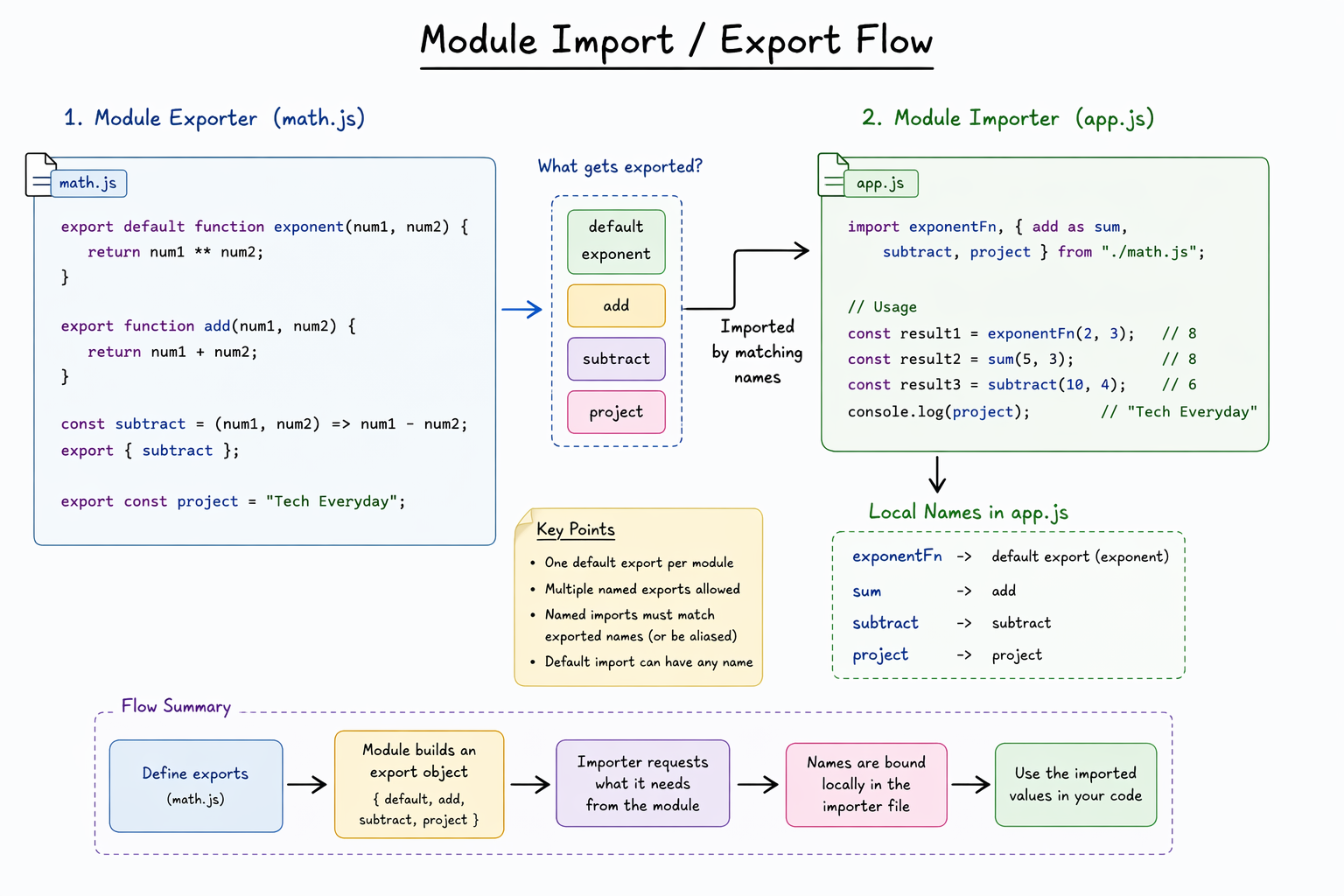
Benefits of modular code
In the very start of the blog, you understood the potential problems of not having a modular code.
Modular code isn’t just about splitting files — it’s about designing your code so each part has a clear responsibility. That’s what makes systems scale, summing up the benefits below:
Easier to understand
Reusability
Better maintainability
Improved collaboration
Scalability
Easier testing
Encapsulation (hiding internal logic)
Clear dependency management
Common Mistakes (BONUS)
When I used to import and export stuff, i did a bunch of mistakes, hope you are careful of them
Wrong spelling for named imports
import {substract} from "./file"
//the exported function was subtract and not substract
Using object destructuring for named imports instead of
asimport {add : sum} from "./file"When we were learning about object destructuring, we used
:to rename the destructured elements and I often used to do the same in imports because of the{}. If you are unable to grasp what destructuring is, better make sure to read this blog . Gotta be careful !
Conclusion
In this blog we learnt about imports and exports, the different ways and the benefits of doing all of this, however in further blogs we would be looking at a more complex part, like circular dependencies and dynamic exports, but this is more than enough that you require to get started with modular coding practices.


