Storing Uploaded Files and Serving Them in Express

In the previous blog, we learned how to handle file uploads in Express.js using Multer and how to integrate it into our system. While this topic can be understood on its own, it becomes much easier to follow if you’re already familiar with how file uploads work and how files are stored after being received by the server discussed in this article.
Where uploaded files are stored
You have understood file uploading, the next obvious question that pops up is where the uploaded files are kept. Understanding this is important, because a lit carelessness and your system is prone to malicious attacks or leaking confidential data.
By default when you have configured multer like this:
const upload = multer({ dest: "uploads/" });
In such a case all the uploaded files exists in a folder named uploads.
project-root/
│
├── uploads/
│   ├── 1712345678-image.jpg
│   ├── 1712345679-file.pdf
│
├── src/
│   └── app.js
In this case, each file that is uploaded through the multer has randomly generated name and is saved on the system disk, You can configure the nomenclature of the files that are uploaded as discussed in this.
At this stage, files are just sitting on your server, they are not yet accessible via browser.
Local Storage vs External Storage
There are two common ways to store the uploaded file:
Local Storage: This is what we are doing right now, we are using multer and storing the files locally on our server's disk.
Pros:Simple to set up
No external dependency
Great for learning and small projects
Cons:
Files are lost if server resets
Hard to scale across multiple servers
Limited storage capacity
External Storage: In most production-grade systems, files are not stored on the server’s local disk. Instead, they are stored in external storage services provided by platforms like Amazon Web Services (S3) or Cloudinary.
The reason for this is simple: local storage does not scale well.
If you application runs on multiple servers or containers, and you store file locally then each instance would have it's own separate file system. This make it difficult to manage uploaded files consistently.
Pros:Scalable
Persistent
Better for production systems
Cons:
More setup
Requires configuration
You now have a conceptual understanding of storage system, there is a lot to discuss about them but it is out of the scope for this article.
Serving Static files in Express.js
Before we jump into the procedure, let's get the concepts clear.
What are static files ?
Static files are web assets—such as CSS, JavaScript, images (JPG, PNG, SVG), fonts, and videos—that are delivered to a user's browser exactly as stored, without requiring server-side processing or dynamic generation. They remain constant for every user, offering high efficiency through caching, and are often referred to as static assets.
What is static file serving?
Static file serving simply means making files from a folder accessible directly via a URL. You need to be thoughtful while exposing and should ask yourself
“If someone accesses this file directly in the browser, is that okay?”
If the answer is no, you understand what thing should not be kept as static. Only expose folders that are safe to be publicly accessed.
Enabling Static serving
Now that you have decided the folder, which you feel should me made publicly accessible, you simply do this:
app.use("/uploads", express.static("uploads"));
You use a middleware, provide the url on which the folder should be accessible and then do express.static(<folder-path >)
The folder-path is resolved relative to the current working directory (usually your project root). If your project looks like:
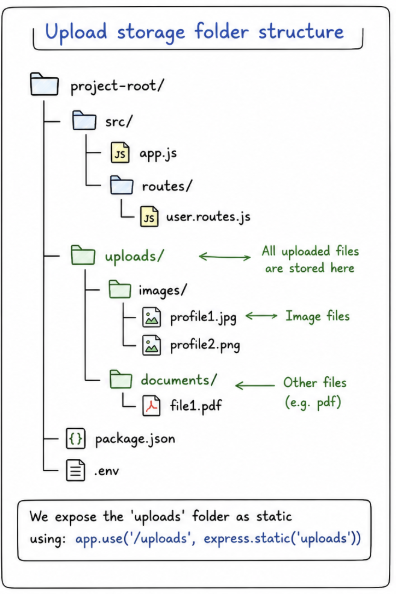
In this case the current working directory is project/ , so now inside app.js you write:
app.use("/uploads", express.static("uploads"));
Express will look for:
project/uploads/
NOT:
project/src/uploads/
This might sound confusing so the best way is to use path:
import path from "path";
import { fileURLToPath } from "url";

const __dirname = path.dirname(fileURLToPath(import.meta.url));

app.use(
  "/uploads",
  express.static(path.join(__dirname, "../uploads"))
);
This is better than previous approach because:
Works regardless of where you run the server
No ambiguity
More production-safe
Accessing uploaded files via URL
Once a static serving is enabled and suppose your file inside the static server folder is:
uploads/profile.jpg
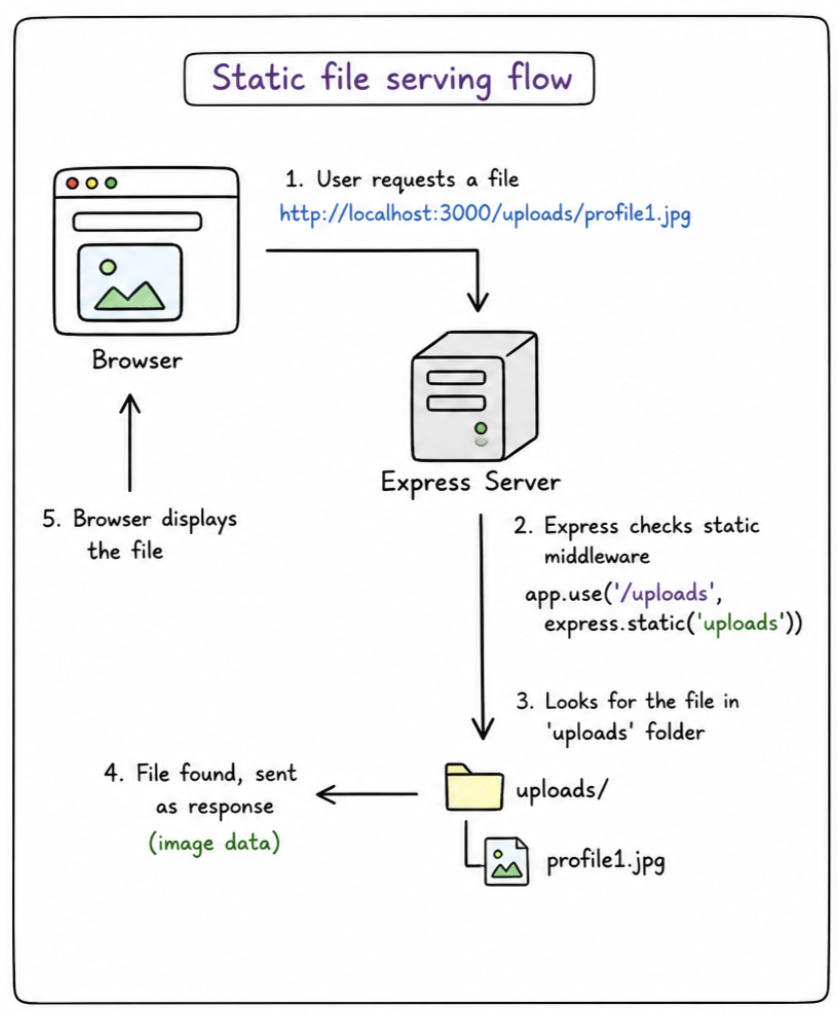
Then you can simply access it in the browser using:
http://localhost:3000/uploads/profile.jpg
Now the browser shall:
Display the image
Open PDF
Play media (depending on file type)
Without
express.static, your files exist but are not publicly accessible.Static middleware acts as a bridge between filesystem and browser.
Security considerations for uploads
With great powers come great responsibilities. You are now able to share your file to the client but this is a risky operation and you need to be careful:
Don’t expose everything blindly
app.use(express.static("src")); // ❌ wrongValidate files before storing
Avoid executable files
Never allow:
.js.exe.sh
These can be dangerous if accessed or executed.
Provide proper path url
app.use(express.static("uploads")); // ❌ risky
app.use("/uploads", express.static("uploads")); // ✅ scoped
These are the common points you should be aware of, but if you want to know how to be safe in storing the files then this article would help you.
Conclusion
Uploaded files in Express are typically stored in a local folder when using Multer. While this is simple and effective for small applications, it is important to understand how to properly serve these files and secure them.
By using static file serving, you can expose uploaded files through URLs, making them accessible to users. However, this must be done carefully to avoid security risks.
In real-world applications, additional layers such as strict validation, safe file naming, and controlled access are essential to ensure that file uploads remain safe and reliable.
Happy Coding !


